

One-on-One Lightroom/Photoshop Tuition
Private Lightroom/Photoshop lessons via online video call. Learn at your own pace with personalized instruction covering importing, organizing, editing, presets, and advanced techniques. Also available Face to Face in Launceston (minimum 2 hours)
Why Choose One-on-One Tuition?
What previous workshop participants say
“Fantastic experience. No matter your level of experience Rick doesn’t make you feel like you are being a hinderance and is willing to help with even the most basic of questions/problems and explains in a way that is easy to understand without getting lost in technical terms. The advice given on how to improve your steps, technique and/or style in capturing an image doesn’t second guess anything that you currently do but expands on your current knowledge without trying to reteach and change.”
Jim Irvine
Tasmania
August 2026
Meet Your Instructor
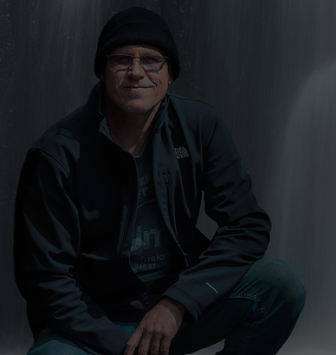
Hi, I'm Rick Budai.
Photographer & Workshop Instructor
I've spent years photographing Tasmania's wild landscapes and helping photographers develop the skills and confidence to create images they're proud of.
My teaching style is relaxed, practical and highly personalised — whether it's a workshop, a private lesson, or a multi-day tour, you'll receive individual attention and guidance tailored to where you're at.
I'll help you understand not just the camera settings, but why they work — so you leave with real skills you can use long after the day is done.
Workshop Overview
What makes this experience special
You might also like


What You'll Learn
- Importing images into Lightroom
- Organizing images and folders
- Understanding the Lightroom interface and shortcuts
- Working with different file formats
- Using collections effectively
- Reading and using your histogram
- Creating virtual copies and non-destructive editing
- Global and local adjustments
- Working with presets
- Sharpening and noise reduction
- Batch editing multiple images
- Merging photos (HDR, Panoramas)
- Gradient and radial filters
- Retouch and healing tools
- Making your images 'Pop'


What's Included
Everything you need for a successful photography experience
Included
- Screen sharing for hands-on learning
- Personalized tips and techniques
- Follow-up support via email
- Custom lesson plan tailored to your skill level
Not Included
- Adobe Lightroom software license
- Computer equipment
- Internet connection
Recommended Equipment
- Laptop or desktop computer with Adobe Lightroom installed
- Stable internet connection
- Microphone for clear communication
- Webcam (optional but recommended)
- Second monitor or device for video call (recommended)
Frequently Asked Questions
Everything you need to know before you book
Requirements
- Access to a computer with Adobe Lightroom installed
- Basic computer skills
- Video calling software (Zoom/Skype)
- Decent internet connection
- Microphone for communication
- Second device or monitor recommended for optimal learning experience
Keep Exploring
Explore Other Experiences
More photography adventures to help you grow your skills